

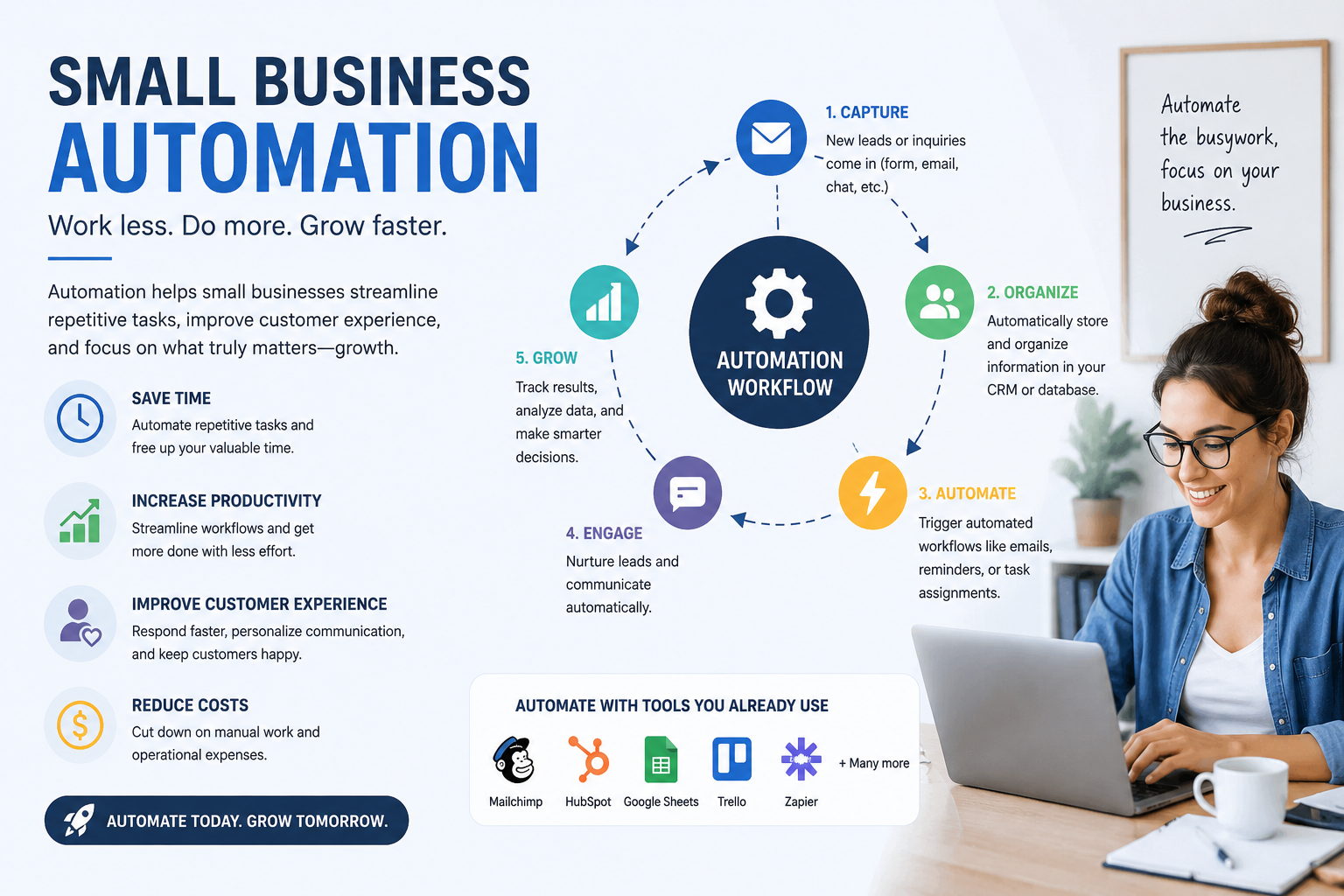
Running a small business often means wearing multiple hats. You might manage customer inquiries in the morning, process invoices after lunch, schedule social media posts in the afternoon, and handle payroll before the day ends. While this approach may work initially, it quickly becomes overwhelming as your business grows.
That's where small business automation comes in. Automation eliminates repetitive manual tasks, allowing you and your team to focus on strategic work that drives revenue and improves customer satisfaction. Thanks to affordable cloud software and artificial intelligence (AI), automation is no longer reserved for large enterprises. Even startups and local businesses can automate workflows without hiring developers or investing heavily in technology.
This guide explains everything you need to know about small business automation, including its benefits, practical use cases, the best tools, and how to build an automation strategy that supports long-term growth.
What Is Small Business Automation?
Small business automation is the process of using software and technology to perform repetitive business tasks automatically with little or no human intervention.
Instead of manually sending emails, updating customer records, creating invoices, or assigning tasks, automation software completes these actions based on predefined rules or AI-powered workflows.
For example, when a customer submits a contact form on your website, an automated workflow can instantly:
Add the lead to your CRM
Send a welcome email
Notify your sales team
Schedule a follow-up reminder
This entire process happens within seconds, reducing delays and improving customer experience.
Why Small Businesses Need Automation
Modern customers expect fast responses, personalized communication, and seamless service. At the same time, small businesses often operate with limited staff and tight budgets.
Automation helps solve these challenges by:
Saving valuable working hours
Reducing operational costs
Improving workflow efficiency
Minimizing manual errors
Increasing customer satisfaction
Supporting business growth without hiring additional employees
Whether you run an online store, marketing agency, restaurant, accounting firm, or consulting business, automation can significantly improve daily operations.
Benefits of Small Business Automation
Save Time
Employees spend countless hours performing repetitive administrative tasks. Automation handles these activities automatically, giving your team more time for strategic work.
Reduce Costs
Automating routine processes reduces labor costs and eliminates expensive human errors. Businesses often achieve higher productivity without increasing payroll expenses.
Improve Accuracy
Manual data entry can lead to mistakes that affect customer service and financial reporting. Automated systems maintain consistent and accurate records.
Deliver Better Customer Experiences
Automation enables businesses to respond faster, send personalized emails, provide instant support through chatbots, and keep customers informed throughout their journey.
Increase Productivity
Teams spend less time switching between software applications because automated workflows connect multiple systems into one seamless process.
Scale Your Business Efficiently
As your business grows, automation handles increased workloads without requiring proportional increases in staffing.
Manual Work vs Automated Workflows
Small Business Automation Examples
Automation can improve nearly every department within a business.
Marketing Automation
Marketing teams frequently automate:
Email campaigns
Social media scheduling
Lead nurturing
Newsletter distribution
Customer segmentation
Landing page follow-ups
For example, a visitor downloads your free guide. The system automatically sends a thank-you email, adds the visitor to your mailing list, and schedules educational content over the next few weeks.
Sales Automation
Sales automation improves lead management by:
Capturing leads
Assigning prospects to sales representatives
Updating CRM records
Scheduling follow-up reminders
Sending proposals automatically
This allows sales teams to focus on closing deals rather than administrative work.
Finance Automation
Financial automation simplifies:
Invoice generation
Expense tracking
Payment reminders
Payroll processing
Tax reporting
Automated accounting reduces mistakes while keeping financial records organized.
Customer Service Automation
Customer support teams benefit from:
AI chatbots
Ticket routing
Knowledge bases
Automated FAQs
Customer satisfaction surveys
Customers receive immediate assistance even outside business hours.
HR Automation
Human resources departments automate:
Employee onboarding
Leave management
Document collection
Performance tracking
Training reminders
This creates a smoother experience for both managers and employees.
AI Automation vs Traditional Automation
Automation has evolved significantly with artificial intelligence.
Traditional automation works well for repetitive tasks with fixed rules. AI automation goes a step further by analyzing data, recognizing patterns, and making intelligent recommendations.
Many businesses now combine both approaches for maximum efficiency.
Business Automation Ideas for Every Industry
Every industry has unique workflows that benefit from automation.
Ecommerce Stores
Order confirmation emails
Inventory management
Shipping notifications
Cart abandonment recovery
Customer loyalty programs
Marketing Agencies
Client reporting
Content approvals
Project tracking
Lead generation
Proposal automation
Real Estate
Property inquiry management
Appointment scheduling
Lead follow-up
Document sharing
Healthcare Clinics
Appointment reminders
Patient registration
Billing
Follow-up notifications
Restaurants
Online reservations
Inventory alerts
Customer feedback collection
Staff scheduling
These business automation examples demonstrate how even simple workflows can significantly improve daily operations.
Signs Your Business Is Ready for Automation
Your business likely needs automation if you experience any of these challenges:
Employees repeatedly perform the same tasks
Customer responses are delayed
Manual data entry causes errors
Multiple software systems don't communicate
Team productivity is declining
Administrative work consumes most of the day
Recognizing these signs early helps businesses implement automation before inefficiencies become expensive.
Best Small Business Automation Tools
Choosing the right software depends on your business size, budget, and workflow requirements.
Some of the most popular small business automation tools include:
Zapier
Make
Activepieces
Microsoft Power Automate
HubSpot
ClickUp
Monday.com
Airtable
Notion AI
Rippling
Each platform specializes in different types of automation, from marketing workflows to HR management and project collaboration.
Comparison of Popular Automation Tools
Businesses should compare pricing, integrations, ease of use, and scalability before selecting a platform.
Choosing the Right CRM for Small Business Free
A customer relationship management system is often the foundation of business automation.
Several providers offer a CRM for small business free plan, making it easy for startups to organize customer data without additional costs.
When choosing a CRM, look for features such as:
Contact management
Email integration
Lead tracking
Sales pipelines
Automation workflows
Mobile access
Reporting dashboards
A free CRM can support business growth while reducing administrative tasks from the beginning.
How to Implement Small Business Automation
Successful automation starts with planning rather than purchasing software.
Step 1: Audit Existing Processes
Identify repetitive tasks performed daily or weekly.
Step 2: Prioritize High-Impact Activities
Focus on workflows that consume the most time or generate frequent errors.
Step 3: Select the Right Software
Choose tools that integrate with your existing systems.
Step 4: Build Simple Workflows
Start with one automation before expanding to more complex processes.
Step 5: Test Everything
Verify that workflows perform correctly before deploying them across the organization.
Step 6: Monitor Performance
Track time savings, productivity improvements, and customer satisfaction.
Step 7: Optimize Continuously
Refine workflows based on employee feedback and business goals.
Common Mistakes to Avoid
Automation delivers the best results when implemented strategically.
Avoid these common mistakes:
Automating broken processes
Using too many disconnected tools
Ignoring employee training
Failing to monitor workflow performance
Skipping software testing
Choosing tools based only on price
Neglecting data security
Addressing these issues early helps businesses maximize automation success.
Should You Hire a Small Business Automation Consultant?
Some businesses prefer professional guidance when implementing automation.
A small business automation consultant evaluates existing workflows, identifies automation opportunities, recommends suitable software, and oversees implementation.
Working with an experienced consultant may reduce costly mistakes and accelerate deployment, especially for businesses with complex operations.
Similarly, many small business automation companies provide end-to-end implementation, software integration, employee training, and ongoing support.
If your organization lacks internal technical expertise, these business automation services can simplify the transition and deliver faster results.
Measuring Automation ROI
Automation should generate measurable business value.
Track metrics such as:
Hours saved each week
Labor cost reductions
Customer response times
Employee productivity
Sales conversion rates
Error reduction
Customer satisfaction scores
For example, if automation saves 20 hours each week and employee time is valued at $30 per hour, that's approximately $600 saved weekly before considering additional productivity gains.
Monitoring these metrics helps justify future automation investments.
The Future of Small Business Automation
Automation technology continues to evolve rapidly.
Emerging trends include:
AI-powered virtual assistants
Predictive analytics
Intelligent document processing
Hyperautomation
Voice-enabled workflows
Autonomous customer support
AI decision-making systems
Businesses that embrace these innovations will likely become more efficient, competitive, and adaptable in changing markets.
Conclusion
Small business automation is no longer a luxury—it is a practical strategy for improving efficiency, reducing costs, and delivering better customer experiences. By automating repetitive tasks across marketing, sales, finance, HR, and customer service, businesses can focus on innovation and growth instead of routine administrative work.
The key is to begin with one or two high-impact workflows, measure the results, and gradually expand your automation efforts. With the right tools, thoughtful planning, and continuous optimization, automation can become a powerful advantage that supports sustainable business success.
Frequently Asked Questions
What is small business automation?
Small business automation uses software and AI to perform repetitive tasks automatically, improving productivity, reducing manual work, and minimizing errors.
What are the best small business automation tools?
Popular options include Zapier, Make, Activepieces, HubSpot, ClickUp, Microsoft Power Automate, Airtable, and Rippling. The right choice depends on your business goals and required integrations.
What are some simple business automation ideas?
Common ideas include automating email marketing, invoicing, appointment scheduling, CRM updates, payroll, customer support, inventory management, and social media posting.
Can small businesses afford automation?
Yes. Many automation platforms offer free plans or affordable subscriptions, allowing startups and small businesses to automate essential workflows without significant upfront costs.
Is AI automation better than traditional automation?
AI automation is more flexible because it can analyze data and make intelligent decisions, while traditional automation follows predefined rules. Many businesses benefit from using both together.
Should I hire a small business automation consultant?
If your workflows are complex or your team lacks technical expertise, hiring a consultant can help identify opportunities, implement solutions correctly, and maximize your return on investment.
How long does it take to implement business automation?
Simple workflows can often be set up within a few hours, while larger automation projects involving multiple departments may take several weeks, depending on complexity.
Leave a Reply